Tip: Just a few little quality of life edits I noticed you can set up in Schoology to make your life (and your students' lives) a little easier! :)
I set them up for you, but figured I would show you a tutorial to save for another year!
1. Click "Course Options"

2. Click "Edit Info"

3. Double-click the "Section Name: *" field.
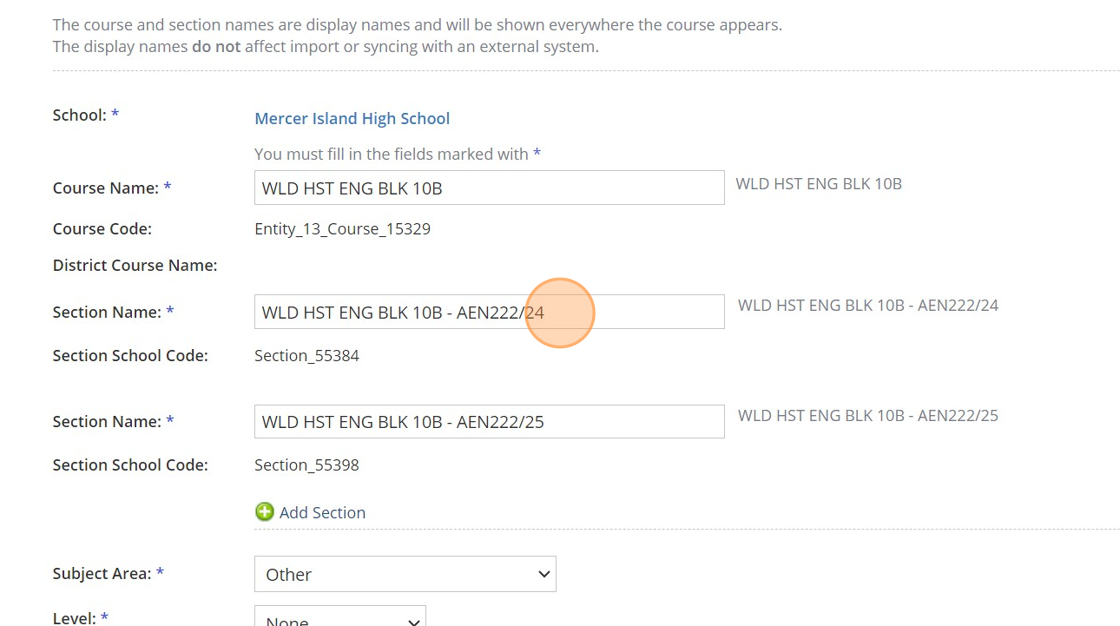
4. Change the name here to whatever you want, most teachers just say the Period number. If you notice on the right-hand side of that box, our High School naming protocols call out which period is which, so,
/24 means second semester, period 4 and /25 means second semester, period 5.

5. Click Save.

6. Now, in your linked courses, you will see Period 4 and Period 5 as your drop down options!

7. Have a wonderful day!

Made with Scribe